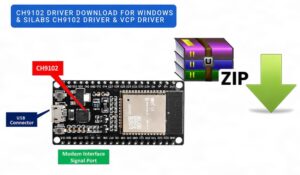
If your board shows up as “USB2.0-Ser!”or driver related error with a yellow warning icon in Device Manager, Windows just doesn’t have a driver for it yet. That’s usually a CH9102 chip (sometimes printed as CH9102F on the board). Once you install the right driver, it’ll show up as a normal COM port. Here’s how to do that.
Quick background on the CH9102 chip, if you care
The CH9102 is a USB-to-serial bridge made by WCH, a Chinese chip design company. It takes USB data and turns it into UART/serial signals your microcontroller understands, and back again. Nothing exotic here – it’s the same job the old FTDI and CP210x chips have always done, just cheaper. It handles baud rates up to 4M and works with serial signal voltages anywhere from 1.8V to 5V, plus it’s got RS485 control and some GPIO pins thrown in.
Why does everyone suddenly have one of these on their board? Cost, mostly. A lot of manufacturers swapped out the older SiLabs chips – the CP2104 and CP2102N – for these WCH parts, so if you’ve bought an ESP32 dev board or some Arduino clone in the last couple years, there’s a decent chance this is what’s soldered onto it.
One more minute detail that actually matters: in Windows, this thing shows up with the hardware ID (USB\VID_1A86&PID_55D4). That ID has to match your device, so if Device Manager shows something different, you might be dealing with a different chip in the CH34x family entirely (there are like a dozen variants). Worth double-checking before you assume the driver isn’t working.
Download CH9102 Driver for Windows 11 & 10
They bundle the CH9102 driver together with a handful of related chips (CH342, CH343, CH344, CH9101, CH9103, etc.) into one package, so don’t panic when you see a bunch of unfamiliar part numbers listed on the download page, that’s normal, it’s just one driver covering a chip family.
Latest Ch9102x driver download for window updated August 2026
File size: 674KB
File version: v1.3
Application scope: CH9102F,CH9102X
Original file name: CH9102EVT.ZIP
Download from here -> 
The Windows package is currently sitting at version 2.2, and WCH does push updates now and then, so it’s worth grabbing it fresh instead of using some three-year-old zip you found buried in a forum post.
Download CH9102 Driver for MacOS
Latest Ch9102x driver download for MacOs updated August 2026
File size: 4.3MB
File version: v2.0
Application scope: CH340, CH341, CH342, CH343, CH344, CH346, CH347, CH9101, CH9102, CH9103, CH9104, CH9111, CH9114, CH9143, CH9149, CH339
Original file name: CH34XSER_MAC.ZIP
Download from here ->
Installing it on Windows (takes maybe 2 minutes)
- Grab CH343SER.ZIP from the link above.
- Extract it. Right-click, Extract All, whatever, you know the drill.
- Go into the folder and run SETUP.EXE.
- Hit Install. A progress bar shows up, wait for it.
- Reboot if it asks you to. Don’t skip this, half the “it’s still not working” complaints online come from people who skipped the restart.
- Plug your board back in, pop open Device Manager, and look under Ports (COM & LPT). You should see “USB-SERIAL CH9102” with a COM number next to it and no warning icon.
Still seeing the yellow triangle after all that? A couple things to try:
- Right-click the broken device, Update Driver, Browse My Computer, and point it manually at the folder you extracted.
- If Windows is outright blocking the install (this happens more on newer Windows 10/11 builds), you may need to disable driver signature enforcement temporarily; Settings, Recovery, Advanced Startup, then Troubleshoot > Advanced Options > Startup Settings, restart, and press 7.
Also check CH341 Driver, PL2303 Driver, CP2102 driver
Installing it on macOS
- Download and unzip CH341SER_MAC.ZIP.
- Run the .pkg installer inside (usually called something like CH34xVCPDriver.pkg).
- macOS will almost certainly block it the first time. Go to System Settings > Privacy & Security, scroll down a bit, and there’ll be a message about software from WCH,then click Allow.
- Restart. Yes, again. macOS won’t actually load the extension until you do.
- Plug in your board, open Terminal, and run: ls /dev/cu.*
Linux? You probably don’t need to do anything
This is the one case where you can just skip the whole download step. Most modern kernels (4.x and up) already ship with driver support for this chip family built in. Plug the board in, and it should show up as (/dev/ttyUSB0) or similar without you lifting a finger.
If it doesn’t show up, check (dmesg) right after plugging it in, that’ll tell you if the kernel even sees the device. And make sure your user’s actually in the dialout group, otherwise you’ll see the port but get permission errors trying to use it: sudo usermod -a -G dialout $USER
Log out and back in afterward. This one trips people up constantly, they add themselves to the group, don’t relog, and then wonder why nothing changed.
Common problems and its solution:
- Yellow exclamation mark won’t go away.
Driver’s either not installed or installed for the wrong chip. Reinstall CH343SER.ZIP, reboot, try again. - Driver installed fine, but no COM port shows up anywhere.
Try a different cable first. This sounds dumb but it’s the actual cause more often than you’d think, plenty of USB cables are charge-only and carry zero data. Also try a rear USB port on your motherboard instead of a front panel or hub. - Arduino IDE or PlatformIO won’t list the port.
Close the whole IDE and reopen it. It scans for ports on launch, not continuously. - Mac says the installer’s from an “unidentified developer.”
That’s expected, it’s not code-signed the way Apple usually wants. Approve it manually through Privacy & Security like mentioned above. - You’ve got old CH340 drivers on there too, and things are acting weird.
Uninstall the old driver first, through Device Manager on Windows, or by removing the old kext/system extension on Mac, before putting the newer one in.
FAQ:
- Is this driver actually free?
Yep. Straight from WCH, no cost, no account needed. - CH9102 vs CH9102F are they different drivers?
Nope, same one. F is just a package/variant marking, the driver package covers both. - Which COM port number will I get?
Whatever Windows feels like assigning that day, honestly. It can even shift between different USB ports on the same machine. Just check Device Manager after plugging in. - Can I get away with using the old CH340 driver?
No. Different hardware ID (VID_1A86&PID_55D4 vs the CH340’s), different driver package. Grab CH343SER, not CH341SER, for this chip. - Should I trust those third-party “download driver now” sites?
Yes. But, the official WCH page takes ten extra seconds and you know exactly what you’re getting.