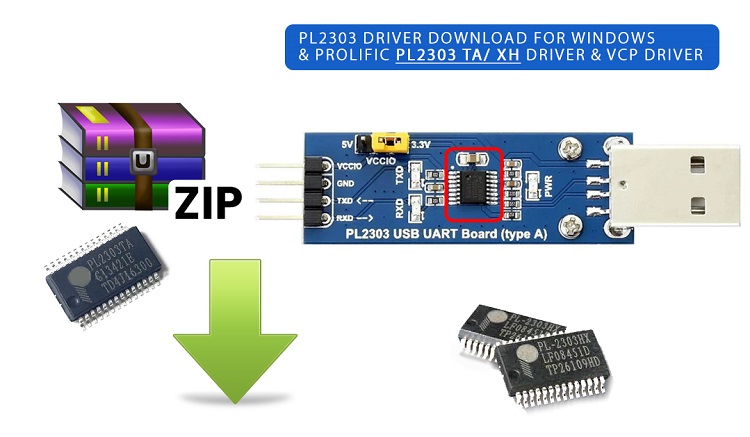
PL2303 Driver Download
The PL2303 DRIVER is the essential software component which makes smooth communication between your computer’s USB port and serial UART devices that use any Prolific PL2303 chipset variants (such as PL2303HX, PL2303TA, PL2303SA, and related models).
(scroll to download)
Inside the PL2303 IC, there is everything that is needed for the USB-to-serial conversion feature integrated: USB interface logic, serial transceiver control, clock generation, and internal data buffers. This high level of integration reduces external components and simplifies hardware design.
The chip supports common serial formats including TTL and RS-232, and it can reliably transmit and receive data across a wide baud-rate range typically from 75 baud up to 1 Mbaud, depending on the chip revision.
Download PL2303 Driver (Windows 11/10/8/7) & Mac OS
The PL2303 USB-to-Serial driver allows your computer to communicate with serial devices such as routers, PLCs, and microcontrollers. Without this driver, your system may show errors like “device not recognized” or Code 10.
Driver Details
-
- Driver Name: Prolific Universal PL2303 Driver Download USB-to-Serial
- Latest Version: Universal ( newer WHQL builds)
- File Size: ~ 12.6 – 15.1 Mb (depends on version)
- Supported OS: Windows 10, Windows 11, Windows 7/ 8, MacOs
- Device Type: USB to Serial (COM Port)
Universal Installer for USB to UART – Download Driver PL2303 Prolific | PL2303TA driver | PL2303HX driver | PL 2303HX driver windows 10 11
Windows 10, Windows 11 (Official Source)
Download link: 
Version: v4.3.0.0 | Size: 12.6 MB
Mac Os 10.x
Link-> Download PL2303 Driver Mac Os
Download link:
Version: 2.0.0 | Size: 2.6 MB
For macOS 11.x version click here-> https://apps.apple.com/us/app/pl2303-serial/id1624835354
Linux Kernel 2.6.15 to 5.4 and above
Link-> Download PL2303 Driver Linux
Download link:
Version: 1.0.7 | Size: 0.5 MB
In the end, the PL2303 USB-to-UART interface IC from Prolific makes available a practical and cost-effective solution for USB serial communication which is most common in development boards, USB-to-serial cables, embedded systems, networking equipment, and industrial control applications. With stable data transfer, broad Windows compatibility, and straightforward driver support, the PL2303 remains a popular choice for bridging USB and serial devices.
Note:
Above links downloads a latest version of installer file that installs the drivers and utilities to better control the PL2303-based devices. Supports PL2303 HXA, XA, HXD, EA, RA, SA, TA, GS and TB versions and works with Windows 11, 10, 7, 8 operating systems in both architecture modes. The driver is certified under Microsoft Certification policy.
– Windows 11 10 Certified WHQL Driver (TH1 1507, TH2 1511, RS1 1607, RS2 1703 versions)
– Windows Vista, 7, 8, 8.1 Certified WHQL Driver
– Compatible with Windows Server2008, 2008R2, 2012, 2012R2, 2016
– Auto-download driver via Windows Update
How to Install PL2303 Driver?
- Download the PL2303 driver from the link given above.
- Locate the file and extract the ZIP file
- Run the installer as Administrator and follow all the on screen steps to complete the installation.
- Restart your computer if required
- Connect your USB-to-Serial device
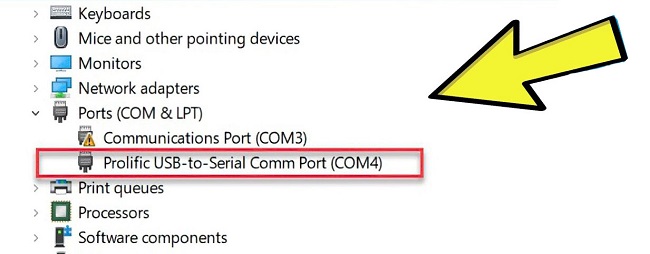
- Check Device Manager if driver installed successfully→ Ports (COM & LPT)
How to Check Your PL2303 Chip Version?
- Open Device Manager
- Expand Ports (COM & LPT)
- Right-click your device → Properties
- Go to Details → Hardware IDs
- Check VID/PID values to identify the chipset
PL2303 Chip Version Compatibility
Different PL2303 chip versions have different driver support depending on the operating system and driver version:
- PL2303TA / TB: Works on Windows 10/11, but may show compatibility errors with newer drivers. Older drivers often fix the issue.
- PL2303HX (Rev D / newer): Generally supported on Windows 10/11 with updated drivers.
- PL2303HXA / XA (older chips): Conditionally supported on Windows 10/11 official drivers. Requires legacy drivers to function.
Note: Some driver versions intentionally block older or non-genuine chips, which may cause errors like “Code 10” or “Device not supported.”